mirror of
https://github.com/Wanxp/obsidian-douban.git
synced 2026-04-04 08:38:41 +08:00
an obsidian plugin that can pull data from douban to your markdown file
| doc | ||
| src | ||
| test | ||
| .editorconfig | ||
| .eslintignore | ||
| .eslintrc | ||
| .gitignore | ||
| .npmrc | ||
| esbuild.config.mjs | ||
| jest.config.js | ||
| License | ||
| main.ts | ||
| manifest.json | ||
| package-lock.json | ||
| package.json | ||
| README.md | ||
| styles.css | ||
| tsconfig.json | ||
| version-bump.mjs | ||
| versions.json | ||

Obsidian Douban Plugin






Import Movie, Book, Music, Teleplay, Note, Game even Broadcast Data from Douban in Obsidian
在Obsidian使用并导入豆瓣中的电影/书籍/音乐/电视剧/日记/游戏甚至是广播, 包含评分/发布日期/演员表等信息
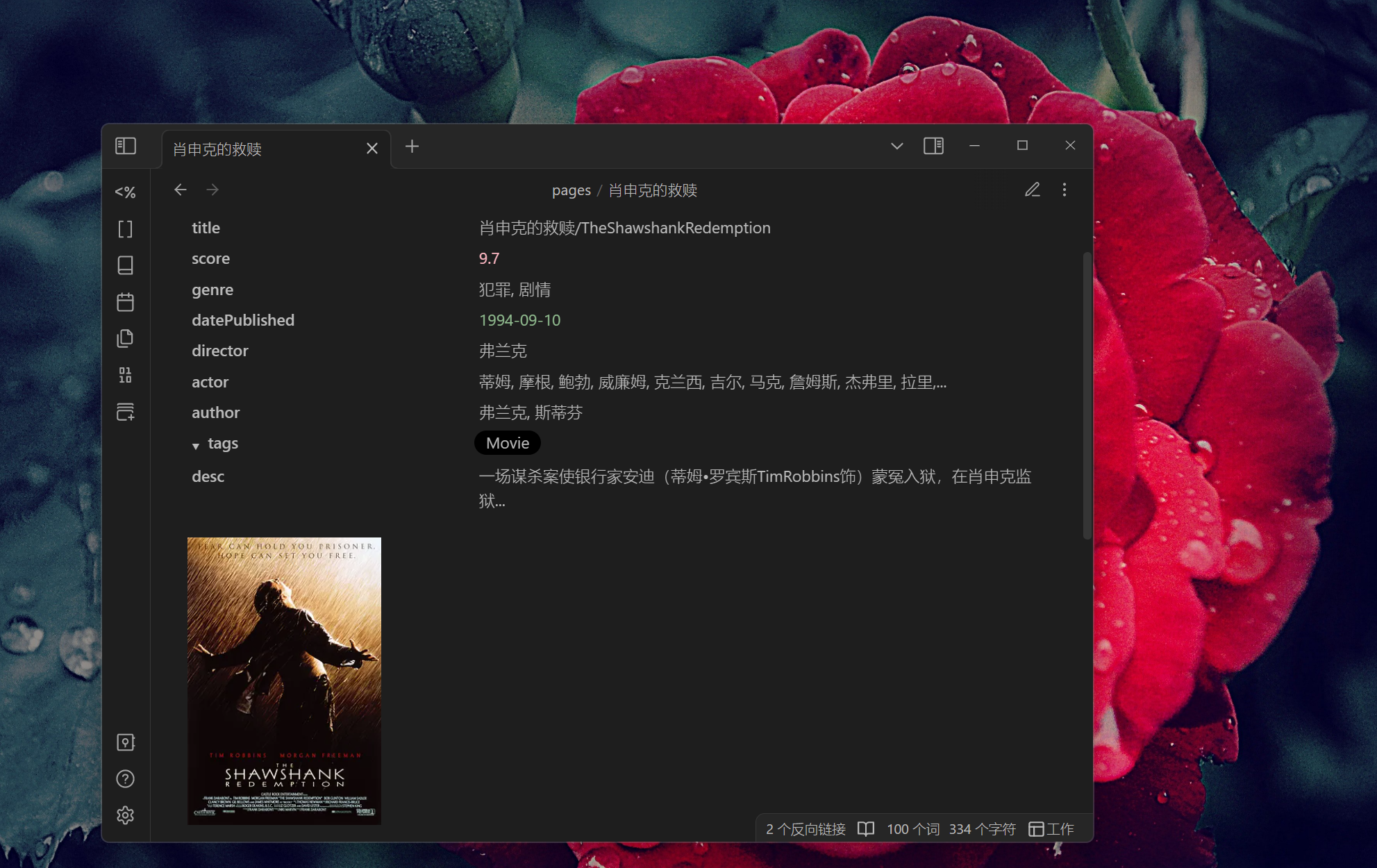
If you want some features or have any questions about this plugin, create issues or join the development is welcome.
关于当前的插件如果有任何疑问, 缺少想要的导入内容或者想要什么功能, 欢迎提issues或加入到开发当中.
Support Field/支持的字段
(若有缺少想导入的字段, 欢迎提issues反馈)
| 字段 | 电影 | 电视剧 | 书籍 | 音乐 | 日记 | 游戏 | 广播 |
|---|---|---|---|---|---|---|---|
| id | 豆瓣ID | 豆瓣ID | 豆瓣ID | 豆瓣ID | 豆瓣ID | 豆瓣ID | - |
| title | 电影名称 | 电视剧名称 | 书名 | 音乐名 | 日记标题 | 游戏名称 | - |
| type | 类型 | 类型 | 类型 | 类型 | 类型 | 类型 | - |
| score | 评分 | 评分 | 评分 | 评分 | 评分 | 评分 | - |
| image | 封面 | 封面 | 封面 | 封面 | 图片 | 封面 | - |
| url | 豆瓣网址 | 豆瓣网址 | 豆瓣网址 | 豆瓣网址 | 豆瓣网址 | 豆瓣网址 | - |
| desc | 简介 | 简介 | 内容简介 | 简介 | 简介 | 简介 | - |
| publisher | - | - | 出版社 | 出版者 | 发布者 | 发行商 | - |
| datePublished | 上映日期 | 上映日期 | 出版年 | 发行时间 | 发布时间 | 发行日期 | - |
| genre | 类型 | 类型 | - | 流派 | - | 类型 | - |
| 扩展1 | director:导演 | director:导演 | author:原作者 | actor: 表演者 | author:作者 | aliases:别名 | |
| 扩展2 | author:编剧 | author:编剧 | translator:译者 | albumType:专辑类型 | authorUrl:作者网址 | developer:开发商 | |
| 扩展3 | actor:主演 | actor:主演 | isbn:isbn | medium:介质 | content:日记内容 | platform:平台 | |
| 扩展4 | originalTitle:原作名 | originalTitle:原作名 | originalTitle:原作名 | records:唱片数 | |||
| 扩展5 | subTitle:副标题 | barcode:条形码 | |||||
| 扩展6 | totalPage:页数 | ||||||
| 扩展7 | series:丛书 | ||||||
| 扩展8 | menu:目录 | ||||||
| 扩展9 | price:定价 | ||||||
| 扩展7 | binding:装帧 |
How to use
Search
-
Search Data By File Name 通过当前文件名搜索
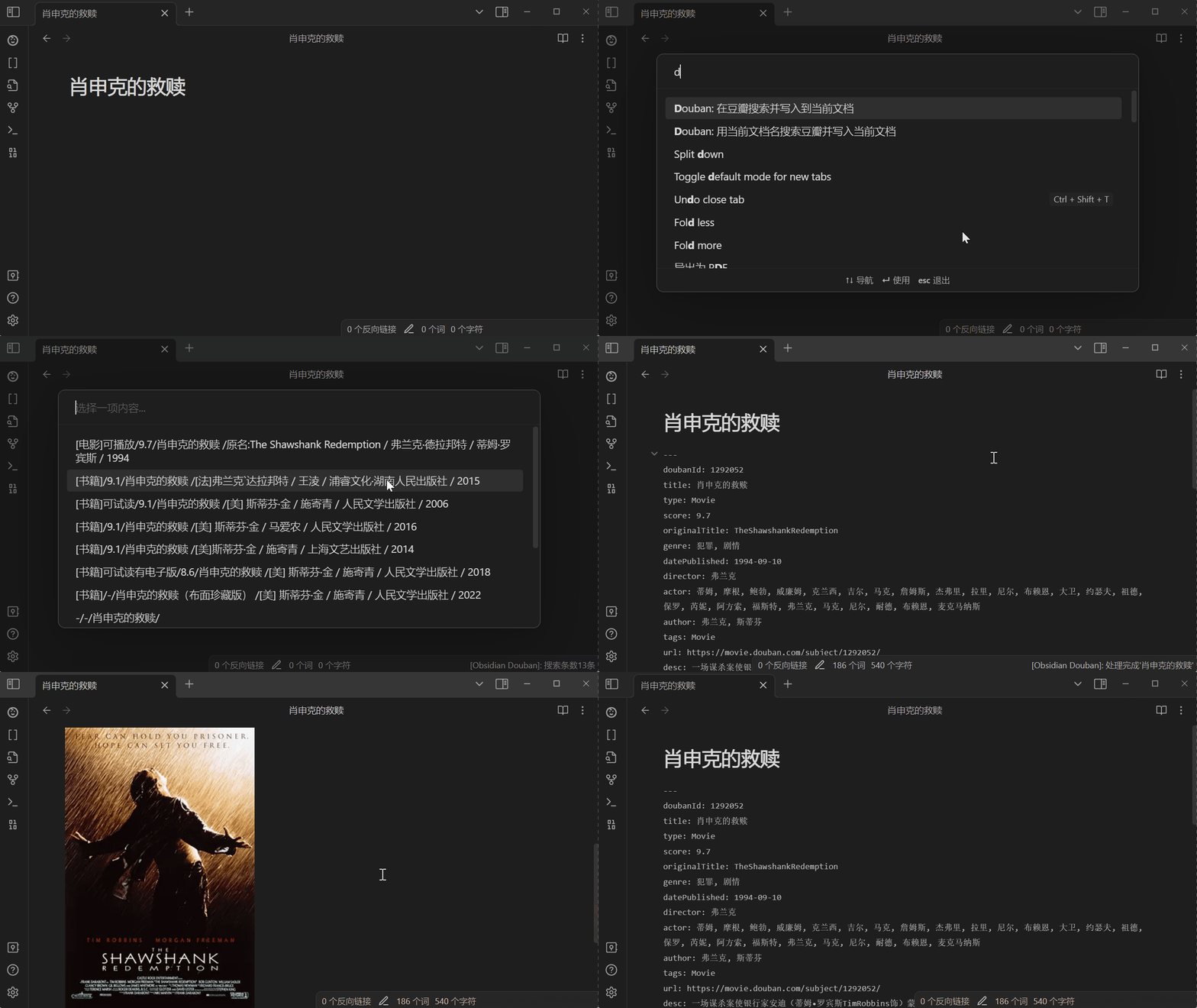
-
Search Movie By Input Text
通过输入文本搜索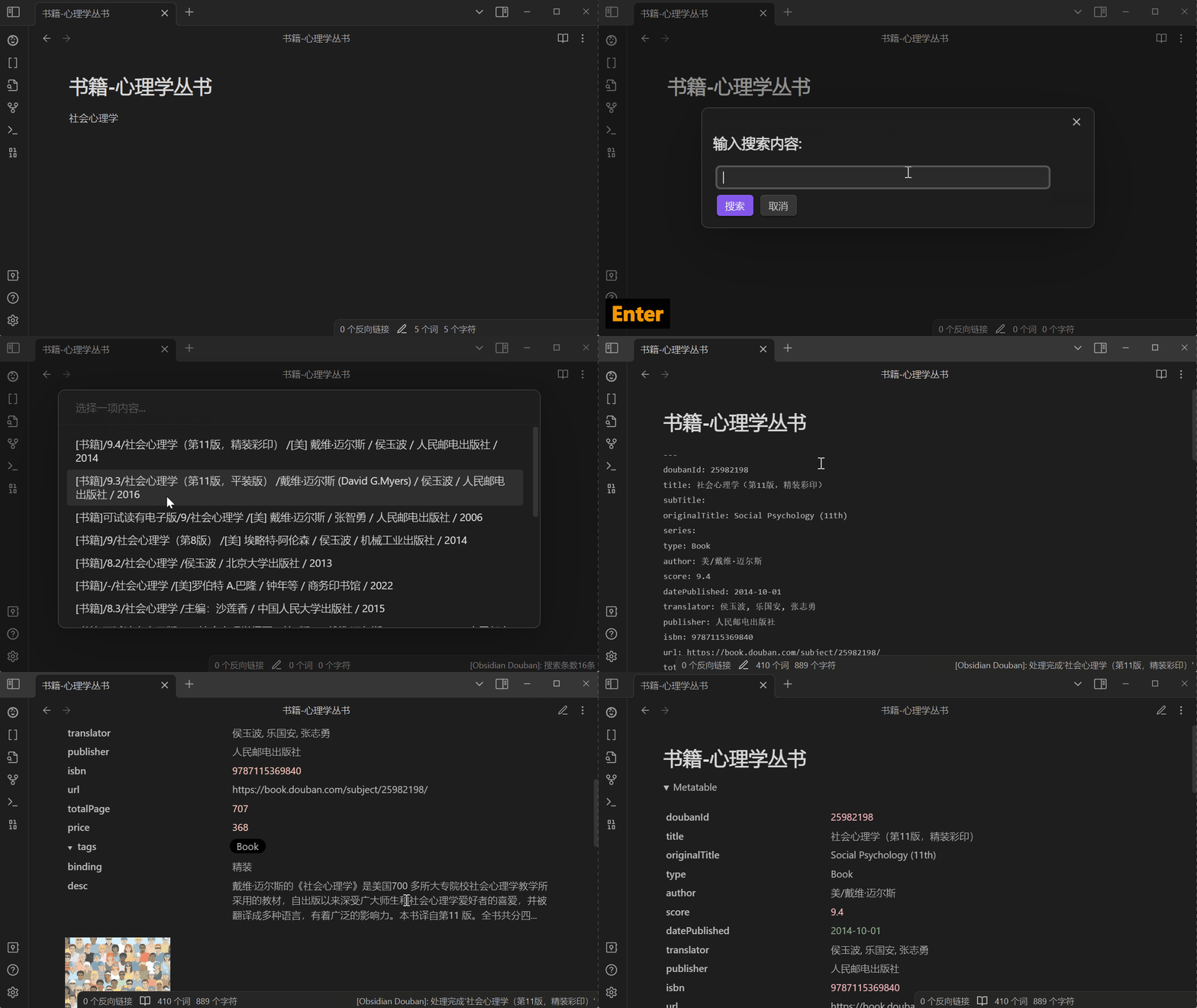
Settings
-
Setting Example1(Custom Template)
设置案例1(自定义模板)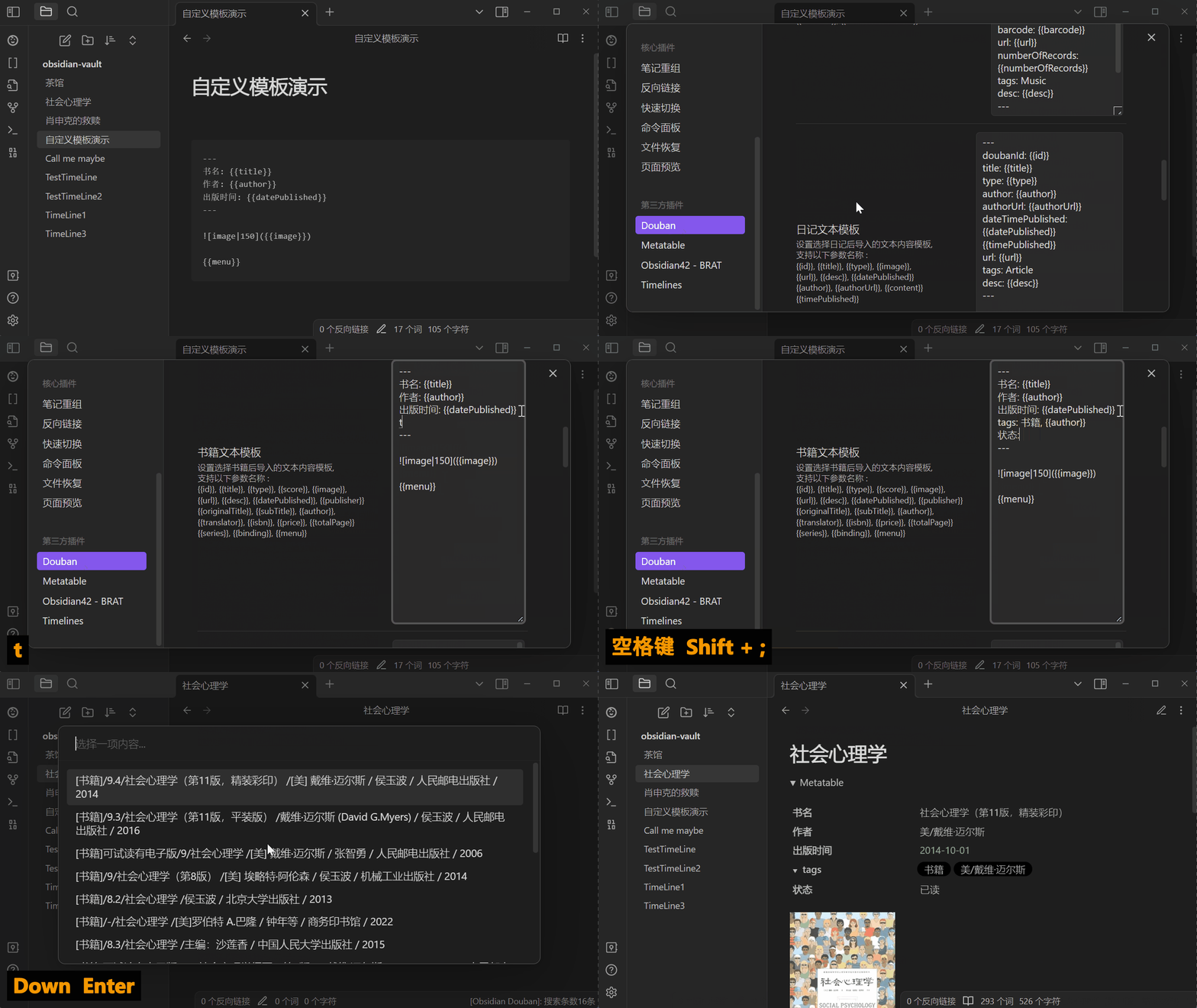
-
Setting Example2(Other Settings)
设置案例2(其它配置)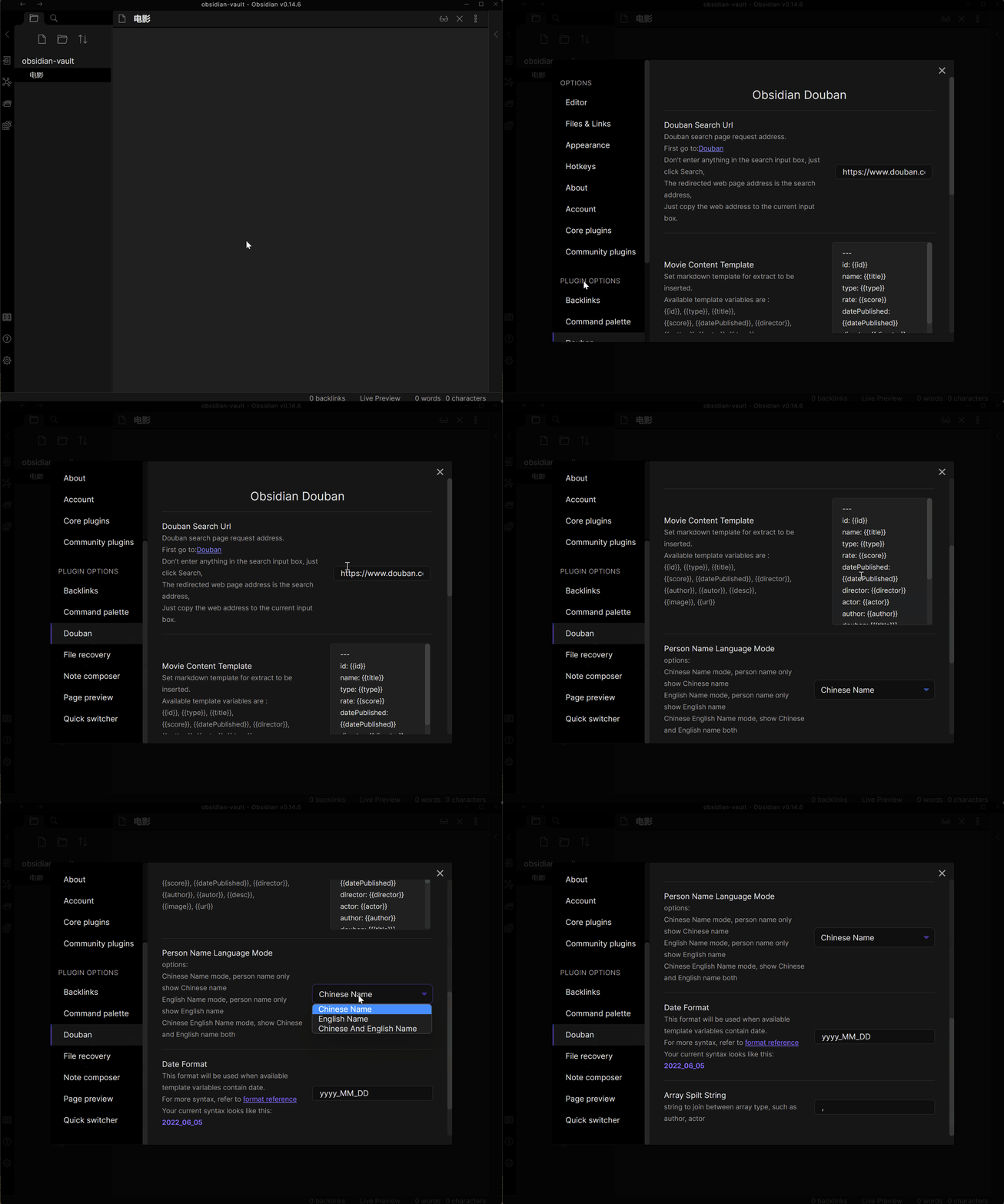
Target
- Movie/电影
- Teleplay/电视剧
- Book/书籍
- Music/音乐
- Note/日记
- Game/游戏
- Broadcast/广播
How to install
From Obsidian
- Go to Obsidian plugin center
- Search obsidian-douban
- Click install
- Enable plugin
从Obsidian插件中心
- 进入Obsidian插件中心
- 搜索obsidian-douban
- 安装
- 开启插件
Manmel
- Download
main.js,manifest.json,styles.cssfrom GitHub release page - Copy step1 downloaded file to your vault folder
/.obsidian/plugins/obsidian-douban/ - Enable plugin in Obsidian
手动安装
- 从Github release 页面下载
main.js,manifest.json,styles.css - 将下载的文件复制到你的Obsidian文档根目录下的
/.obsidian/plugins/obsidian-douban路径,若不存在则新建文件夹(注意.obsidian文件夹可能是个隐藏为文件夹) - 在obsidian插件中心开启当前插件功能
How to Develop
- Enter your test vault folder
/.obsidian/plugins/ - Clone Code
git clone git@github.com:Wanxp/obsidian-douban.git - Enter folder
cd obsidian-douban - Build
npm run build - Run and Watch code chang
npm run dev - Go to your Obsidian plugin center reload this plugin
- Enjoy your develop
- 进入你的Obsidian测试文档文件夹下的
/.obsidian/plugins/ - 克隆代码
git clone git@github.com:Wanxp/obsidian-douban.git - 进入代码文件夹
cd obsidian-douban - 构建
npm run build - 运行
npm run dev - 进入Obsidian插件中心重新加载当前插件
- 享受开发吧